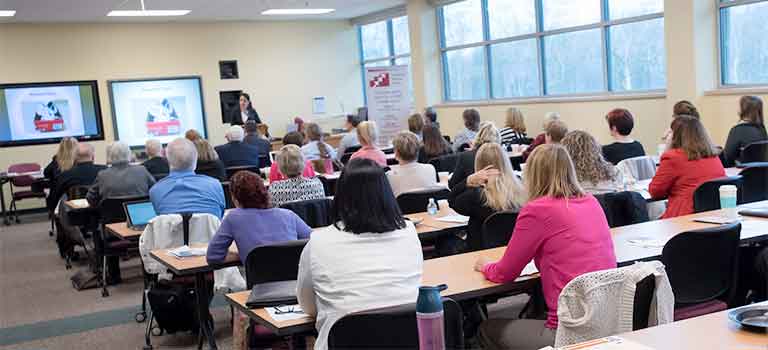
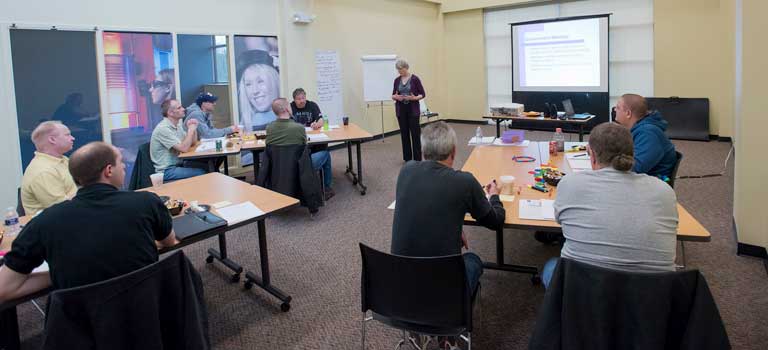
The Software Training and Technological Services unit provides specific training for administrative and academic software used University wide such as PeopleSoft and Springboard.
This group also provides training for widely used software programs.
To provide the support you need, Software Training and Technological Services staff provide a wide variety of training services to the university community, ranging from Microsoft Office Applications to PeopleSoft Software Training.
The staff is ready to help the University community use software technology more effectively.
Email: Sue McKibben
Phone:(330-972-6391)
| Resource | Description |
|---|---|
| Checkbox Survey Tool | Complete training materials for sending out your first survey. Training documents include:
|
| Curriculum Proposal System | CPS, or the Curriculum Proposal System, is an automated workflow system, based on the Oracle BPM Workflow Tool, which supports the academic approval process for curriculum proposals and performs many of the administrative steps in that process. |
| Digital Signage - Four Winds | Training Materials including:
|
| ecrt Documentation and Tutorials NEW | Effort Certification and Reporting Technology training and documentation.
|
| Email Etiquette | Tutorial and job aid on email etiquette |
| Faculty 180 Documentation | Faculty 180 training and documentation:
|
| Microsoft Internet Explorer Basics | Learn how to reset Internet Explorer to ensure compatibility with PeopleSoft. Learn how to troubleshoot common problems by clearing the browser history (cache, cookies, etc...), and configure the browser's pop-up blocker to work correctly in the UA environment. |
| Microsoft Office 2007 | A significant upgrade from earlier versions and the newest Office version on campus. Preview new features and learn about the new Ribbon.
|
| Microsoft Office 2010 | Training Materials for Microsoft Office 2010.
|
| Microsoft Office 2011 for Mac |
Training Materials for Microsoft Office 2011 for Mac.
|
| Microsoft Office Communicator | Learn to install and use UA chat software used on campus.
|
| Microsoft Project 2010 | Learn to use Microsoft Project Server for time entry, timesheet processing, and reporting task status. |
| Microsoft Security Essentials | Viruses and worms are malicious programs that are designed to damage your computer or destroy the data which resides on your computer. Learn what you can do to avoid computer viruses.
|
| Nolij - Documentation | Learn how to use Nolij software.
|
| PeopleSoft: Advising | Manuals, job aids, and a tutorial on using the Advising feature in PeopleSoft. |
| PeopleSoft: Faculty Self Service - Version 9 | Faculty Self-Service documentation:
|
| PeopleSoft: Financials Training | PeopleSoft is the enterprise software used by The University of Akron. Learn the basics as you get an introduction to the Financials module, Requisitions, Financial Inquiry & Budgets.
|
| PeopleSoft: HR and Payroll Self Service | Documentation:
|
| PeopleSoft: Query Manager | Manuals from the Query Manager instructor-led training. |
| PeopleSoft: SA/HR - Version 9 | Prepare for the upgrade to PeopleSoft 9 and learn common tasks. Documentation:
|
| PeopleSoft: Student Center Self Service - Version 9 | How do I ?
|
| PeopleSoft: Term Academic Activity Reporting (TAARS) | Documentation and tutorials on the TAARs process. |
| Phishing Tutorial | What is phishing? Am I a victim? Learn all about the newest form of email scamming and how to protect yourself.
|
| PicPick | PicPick is a screen capture tool. Documentation includes installation and quick guide. |
| Proofpoint Spam Filtering | Proofpoint is an email security solution that processes all incoming UA email. Get the job aid. |
| Physical Facilities - Work Order Requests | How to add a work order request and enter/view work order request. |
| Purchasing: Procurement | Documentation and tutorials on:
|
| Recruiting Solutions Documentation | Documentation and tutorials:
|
| Seminar View/Register | Register for Training Services seminars. View available training seminars |
| SharePoint Documentation | Documentation:
|
| Smart Phone Information | Smart phone support for Faculty and Staff. |
| Springboard! | Self-Help Guides, videos, and user manuals to help answer your frequently asked questions. |
| Spyware and Adware Prevention | Learn the difference between spyware and adware, and then learn how to protect your computer from both.
|
| Term Academic Activity Reporting (TAARs) | Quick Guides and tutorials for reports, teaching activity, other activities, and a PDF TAARs Manual. |
| Telephone Billing Reports | Documentation:
|
| UA Planning Calendar | Documentation:
|
| Windows 7 Basics | Documentation:
|
| Zipspace: Setting-up and Using | Documentation:
|
|
Resource |
Description |
|---|---|
| Microsoft Security Essentials | Viruses and worms are malicious programs that are designed to damage your computer or destroy the data which resides on your computer. Learn what you can do to avoid computer viruses.
|
| Microsoft Internet Explorer/Portal Basics | Learn how to reset Internet Explorer to ensure compatibility with PeopleSoft. Learn how to troubleshoot common problems by clearing the browser history (cache, cookies, etc...), and configure the browser's pop-up blocker to work correctly in the UA environment. Learn how to use ZipLine, UA's portal.
|
| Microsoft Office 2010 Documentation | Training Materials for Microsoft office 2010:
|
| Microsoft Office 2007 Documentation | A significant upgrade from earlier versions and the newest Office version on campus. Preview new features and learn about the new Ribbon.
|
| My Akron Experience | Video tutorial for users of the new University of Akron student and employee web portal. |
| Smart Phone Information | Smart phone information for students. |
| Springboard! | Self-Help Guides, videos, and user manuals to help answer your frequently asked questions. |
| Spyware and Adware Tutorial | Learn the difference between spyware and adware, and then learn how to protect your computer from both.
|
| Student Center Self Service - Version 9 | How do I ?
|
| ZipSpace: Setting-up and using | Documentation:
|