
My Degree Progress Report
An online report showing how close you are to graduating and what classes you need to take.
My Degree Progress Report (My DPR) is an online guide to assist you in reviewing your academic progress toward a degree. In addition, UA will use it for the final degree-clearance process.
Based on your current academic record, My DPR will display your academic requirements, including what requirements have been fulfilled and what needs to be completed in order to complete your degree.
My DPR is accessible in your Student Center in My Akron.
How to produce My DPR:
There are three different ways to produce a DPR in My Akron:
- On the My Experience tab, click on the My DPR icon:

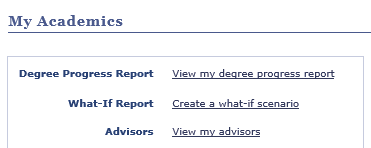
- In your Student Center under Academics, click on the “My Academics” link and then click on the “View my degree progress report” link:
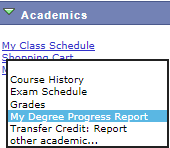
- In your Student Center under Academics, click on the drop-down, select “My Degree Progress Report,” and then click on the double-arrow:
How to read My DPR:
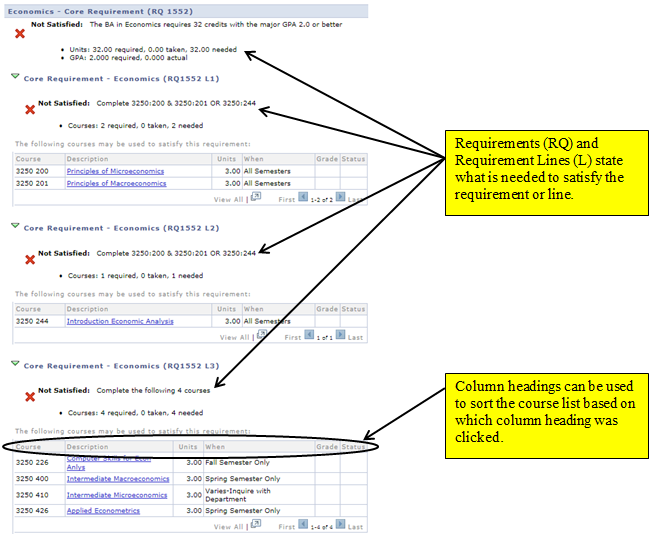
Icons that appear in My DPR:

Requirement (RG, RQ, or L) is Not Satisfied

Requirement (RG, RQ, or L) is Satisfied

Course in course list has been taken

Course in course list is currently registered or has an IP grade
How to produce a What-If report:
- In your Student Center under Academics, do one of the following:
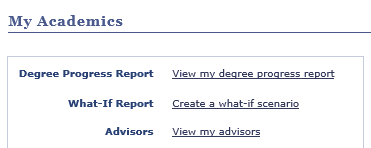
- Click on the "My Academics" link, and then click on the "Create a what-if scenario" link.
- Click on the drop-down, select "What-if Report", then click on the double-arrow.
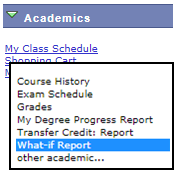
- Click on the "My Academics" link, and then click on the "Create a what-if scenario" link.
- Click on the
 button.
 - Under the Program Scenario section, your current Area of Study (major) will be listed. To produce a what-if for a different Area of Study (major), click on the drop-down and select a different Area of Study from the list.
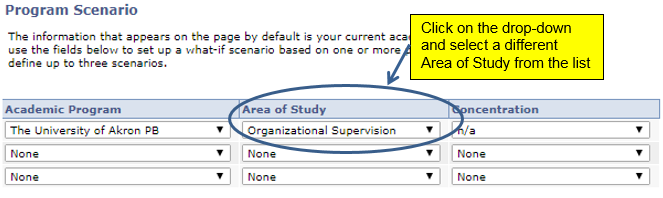
- Click on the
 button.
QUESTIONS?
Please see your academic advisor if you have questions about the course requirements in My DPR.