Student Employment
Federal Work Study Program
The Federal Work-Study (FWS) Program is a federally funded, campus-based aid program designed to offer part-time on-campus job opportunities for eligible students who have received a financial aid Federal Work-Study award. The Office of Student Financial Aid manages Federal Work-Study awards. Questions? Contact the Office of Student Financial Aid at finaid@uakron.edu or 330-972-7032.
Off-Campus Federal Work Study Program
UA’s Off-Campus Federal Work Study program is a federally funded, need based program that partially or fully funds off-campus community service jobs with eligible organizations for UA students with Federal Work Study awards. Interested employers may contact Career Services & Student Employment to learn more about this program at studentemployment@uakron.edu.
Search and Apply for On-Campus Jobs
- View the list of on-campus job openings posted on Handshake, UA’s job board, and apply for positions that interest you. Students are also encouraged to visit departments on campus to ask about on-campus job opportunities and apply directly to the department.
- Search Handshake, UA’s networking and job board.
New students enrolling in classes at The University of Akron for an upcoming semester, you will automatically receive access to Handshake when you receive your UA email and are a confirmed student.
Current students can find on-campus job openings on our website and in Handshake.
- Once logged in, select “The University of Akron Sign On”. Type in your UA Net ID or UA E-mail and Password and click Login.
Attend Student Employment Job Fairs each semester. View and register for events on Handshake.
Meet with your Career Services advisor. Learn how to find on-campus jobs, build your resume, and practice your interviewing skills with a mock interview.
Student Employment Manager Information
Post Job Opportunities for On-Campus Student Employees on Handshake, UA’s Job Board (Free!). Once you have a user account on your department’s Handshake account, log in to Handshake and click on Create Job (see below).
- Need to Add Yourself as a User to Your Department’s Handshake Account? Create a User Account. When connecting with your department on Handshake, please use your UA email address to create your Handshake user account. You will need to create and confirm a password. After creating your user account, you will need to connect to your department’s existing employer account. Your user account may need confirmed by the account owner. Once you are able log in to your Handshake department account, click on Create Job (see below).
- Need to Create a Department Handshake Account? Create a Department Account. You must first create a new user account with your UA email address to create your Handshake user account. You will need to create and confirm a user password. After creating your user account, you will need to create a new employer/company account. You will receive an email with a link within 10 minutes to verify your email. Please make sure to check your junk and spam folders. Once you are able log in to your Handshake department account, click on Create Job (see below).
- Help article for Creating a New Account
- Support in Writing a Job Description to Post to Handshake
Create Job to post your on-campus student employment position. The on-campus student employment job will be available to current and newly enrolled UA students to view on Handshake once approved. This job will be included in a list of current openings on UA’s webpage: View the list of on-campus job openings.
Student Employment Hiring in Workday
To get started hiring student employees, hiring job aids are available in Workday under Workday Help app. Go to the menu on the left-hand side of the Workday homepage and click on the Personal tab and then the Help tab to go to the Help Center. There is a category for Student Employment articles, which include relevant job aids.
Please review the job aids Student Employment Eligibility Requirements and Student Employees: Hire or Add Job. Once an on-campus student employment job offer has been received and accepted, the manager will need to review the eligibility requirements and initiate the hire request in Workday.
Here is a direct link to the Workday Help Center: https://www.myworkday.com/uakron/wdhelp/helpcenter
Once the hire is approved in Workday, the student and manager will receive instructions via email regarding the next steps in the Workday onboarding process.
Students may start work once the manager receives notification that the Form I-9 has been completed in person by the student and properly authorized in Workday. The Workday notification signifies that the student may begin work.
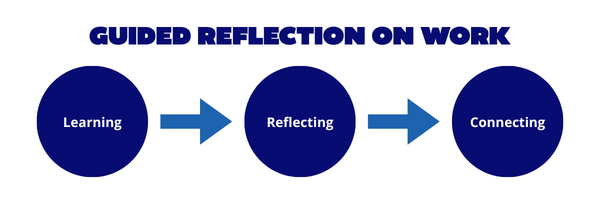
 ZipsGROW@work (Guided Reflection on Work) is a new program piloted with Student Affairs for spring 2026. The program is designed to help students connect their classroom learning with their on-campus work experiences. Through structured conversations between student employees and managers, ZipsGROW@work encourages students to reflect on how their work and academic experiences are related.
The goal of the program is to elevate the role of student employment as a high impact engagement strategy through the implementation of a mentorship program between managers (staff and faculty) and student employees to foster enhanced engagement and help students gain work and career related skills. This program will be evaluated and rolled out to the rest of the campus in fall 2026.
Return to our main Career Services & Student Employment webpage using this link.