NFC Zip Card
Updated Zip Cards with NFC Technology
The updated Zip Cards now include NFC (Near Field Communication) technology, along with the existing magnetic stripe and barcode on the back of the card. The NFC feature will support the new contactless door access readers being installed by Locking Systems in non-residential buildings across the main campus.
If you do not currently use your Zip Card for door access, there is no immediate need to replace your card. However, if you use your Zip Card to access buildings or secured spaces, we recommend obtaining a updated card as soon as possible to ensure continued access as the new readers are deployed.
Replacing your Zip Card also provides an opportunity to update the photo associated with your card, which is displayed in Workday.
Zip Card Office Hours
Monday through Friday 8:00 a.m. to 5:00 p.m.
Closed Saturday and Sunday
Replacement Costs
- No charge if you return your current Zip Card when receiving the new card.
- $20 replacement fee if you do not return your current Zip Card.
How to Identify a NFC-enabled Zip Card
You already have an NFC-enabled Zip Card if the card displays the NFC contactless symbol in the lower-right corner and the 16-digit card number is printed in white.
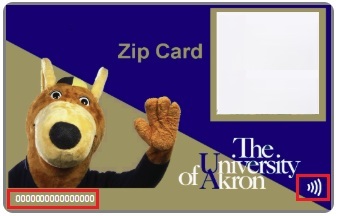
If you are unsure whether your card is NFC-enabled, please stop by the Zip Card Office and staff will be happy to assist you.
Quick Tips for Caring for Your Zip Card
Keep Your Card Safe
- Don't bend, twist, or punch holes in your card.
- Store your card in a wallet or on a lanyard with a cardholder.
- Avoid keeping your card in your back pocket, where it can flex or break.
Protect the NFC/Contactless Chip
- Don’t punch holes in the card — it can break the internal antenna which is around the perimeter of the card.
- Avoid bending or putting heavy pressure on it.
Protect the Magnetic Stripe
- Keep your card away from devices that contain magnets or generate magnetic fields, such as:
- The back of your phone
- Earbud charging cases
Avoid Heat, Moisture, and Chemicals
- Don't leave your card in hot locations, such as a vehicle dashboard.
- Keep your card out of washers, dryers, and pools.
- Clean your card only with a soft, dry cloth. Do not use alcohol wipes or harsh cleaners.
Normal Wear & Tear If your card becomes worn from normal use, such as horizontal wear caused by repeated swiping, it can be replaced at no charge when the damaged card is returned.